The Writing Process

Having trouble getting started? Don't even know how to start writing?
Check out the links on the right under "The Writing Process" for some ideas and insight to get the ball rolling!

Invention

Struggling with organizing ideas? Outlining your essay? 
Check out the links on the right under "Invention: Finding & Developing Ideas" to help build your essay!

Writer's Block
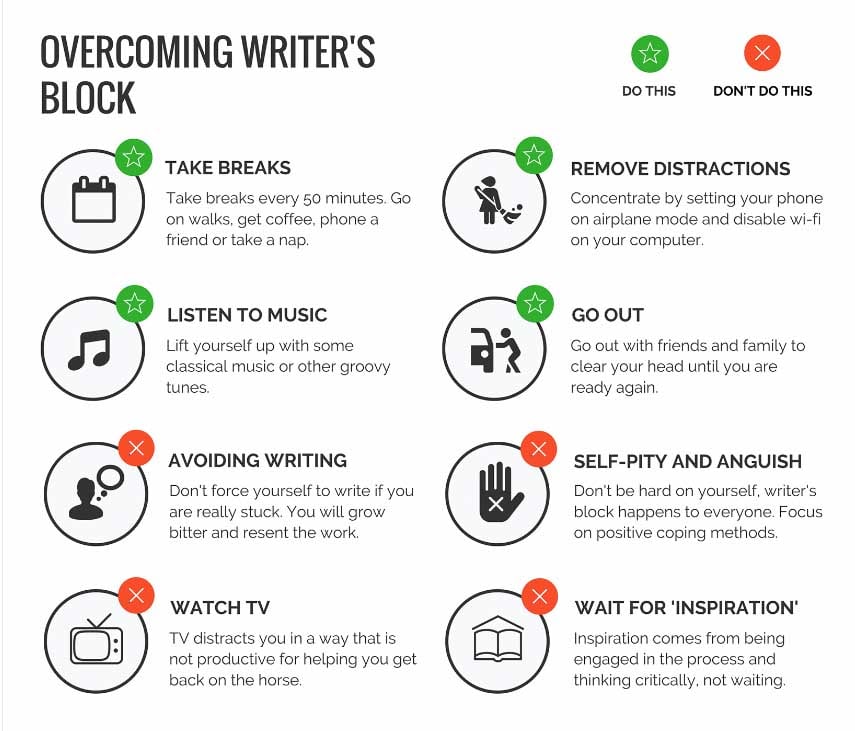
Revision

Check out the resources on the right under "Revision" to help strengthen your paper!


Citation

Whenever you make a claim in a paper, you need to cite where you're getting that information from.
Use the resources on the right under "Integrating Sources" for help on proper citations!

Also be sure to check out the links below:

Grammarly 
Great resource for proofreading, editing, citations, etc.
Just about everything you need to craft a great paper!

Purdue Online Writing Lab
Online resource to generate citations (MLA, APA, Chicago, etc.),
as well as plenty of tips and tricks for the writing process!


Here is the page for APA Format

Here is the page for MLA Format


Below are Style Guides for APA and MLA format.


Feel free to "right click" and "save" these images!


APA Citations


MLA Citations

  • The Writing Process

    Name Description Status Source
    Perfectionism - Anne Lamott Required Perfectionism, Anne Lamott.doc
    Reader-based vs. Writer-based Prose Required writer vs reader based prose.doc
    While focused on a reorder icon, press the Enter key or spacebar to "select" the icon. While a reorder icon is selected, pressing the up and down arrows will change the order of the selected item within the list. Pressing Enter key or spacebar again will drop the selected item at that location in the list.
  • Invention: Finding & Developing Ideas

    Name Description Status Source
    Audience Analysis Required Audience Analysis.docx
    Heuristics Required Heuristics.docx
    Problem, Solution, Advantage Required Heuristics for Developing an Argument.docx
    What is the Issue? Required What Is the Issue.doc
    While focused on a reorder icon, press the Enter key or spacebar to "select" the icon. While a reorder icon is selected, pressing the up and down arrows will change the order of the selected item within the list. Pressing Enter key or spacebar again will drop the selected item at that location in the list.
  • Revision

    Name Description Status Source
    All You Need to Know About Revision Required All You Need to Know About Revision.doc
    Defining Thesis: Content & Style Required Defining Thesis - Content & Style.doc
    Dear Reader Letter: Thesis Required Dear Reader Letter - Thesis.docx
    Dear Reader Letter: Revision Required Dear Reader Letter - Revision.docx
    Read Aloud or Read Backwards Required Read Aloud or Read Backwards.docx
    Revision Checklist Required Interview Your Draft.docx
    Peer Review Revision Questions Required Peer Review - Revision Questions for Consideration.docx
    Transitions Required 10) Transitions.doc
    While focused on a reorder icon, press the Enter key or spacebar to "select" the icon. While a reorder icon is selected, pressing the up and down arrows will change the order of the selected item within the list. Pressing Enter key or spacebar again will drop the selected item at that location in the list.
  • Integrating Sources

    Name Description Status Source
    Dear Reader Letter: Integrating Outside Sources Required Dear Reader Letter - Integrating Sources.docx
    Incorporating Quotations or Paraphrases Required Quotation Sandwich.docx
    While focused on a reorder icon, press the Enter key or spacebar to "select" the icon. While a reorder icon is selected, pressing the up and down arrows will change the order of the selected item within the list. Pressing Enter key or spacebar again will drop the selected item at that location in the list.
While focused on a reorder icon, press the Enter key or spacebar to "select" the icon. While a reorder icon is selected, pressing the up and down arrows will change the order of the selected item within the list. Pressing Enter key or spacebar again will drop the selected item at that location in the list.
Edit the following settings for all selected Resources.
Select a start and end date and time
Start: Start:
End: End: